
RajaGame Deposit – Add Money in Just 2 Minutes
Fund your RajaGame wallet instantly with secure UPI QR payments using multiple trusted channels like IceQR, OOPayQR, ARPayQR, RePayQR and more. You can select a quick amount between ₹100 and ₹50,000 or enter your own custom amount as per your need. Pay using Paytm, PhonePe, Google Pay or any other UPI app by simply scanning or uploading the QR code generated on the Raja Game deposit page. After completing the payment, share your UPI reference number (UTR) and your balance will be reflected in your wallet within minutes. The entire process is fast, safe and simple, so you can focus on playing instead of worrying about payments.
Table of Contents
What is Deposit on Raja Game?
A deposit on Raja Game means adding money to your gaming wallet. This balance allows you to play popular games like Teen Patti Live, Andar Bahar, Poker, Baccarat, Roulette Live, and more. Once the deposit is successful, the amount is credited instantly, so you can start playing without waiting.
Login or Register on RajaGame
- Open the RajaGame website or app.
- If you already have an account:
- Enter your Login ID / mobile number and password
- Tap Login
- If you are new:
- Tap Register / Sign Up
- Fill in your details and complete registration
- Once logged in, you will see your home/dashboard.
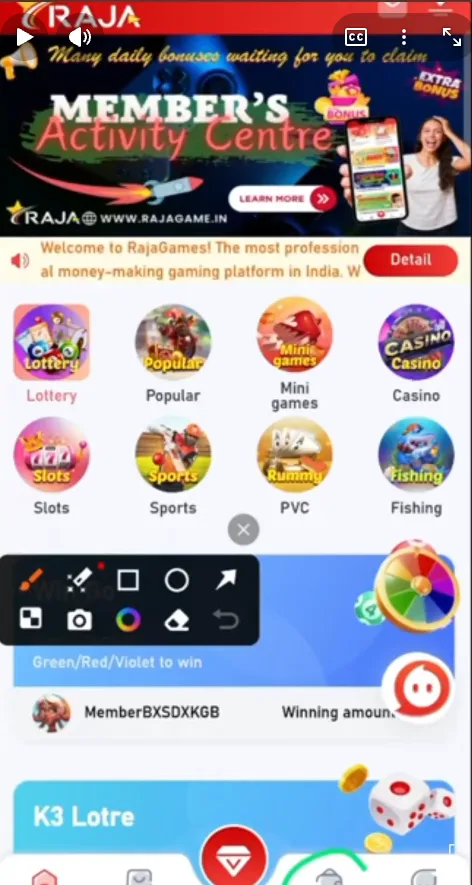
Open Wallet and Rajagame Deposit Section
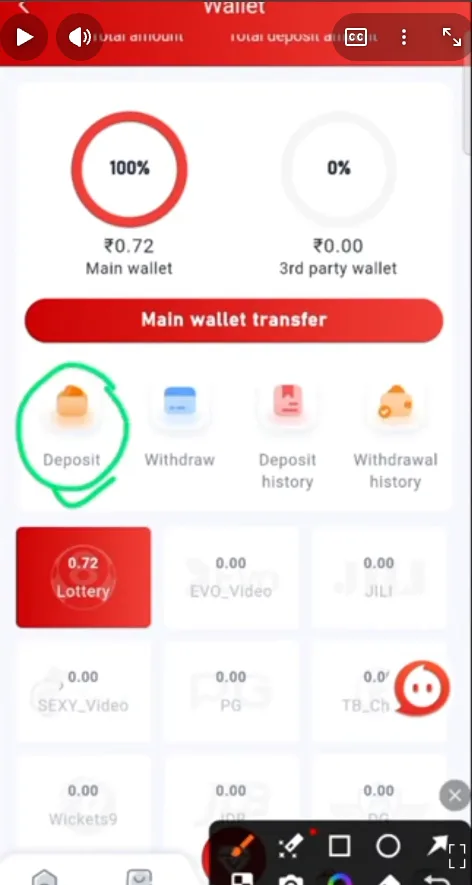
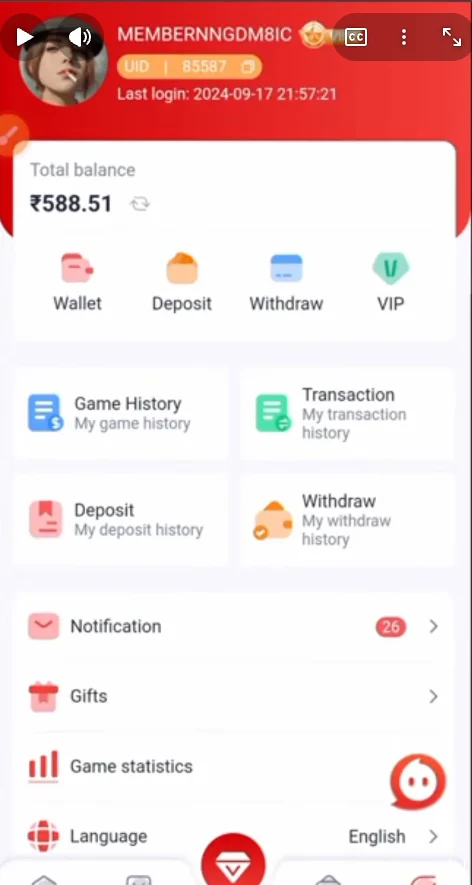
- On the main screen, tap on Wallet.
- Inside the wallet, tap the “Deposit” button.
- A Raja game Deposit page will open with different channels and payment options.
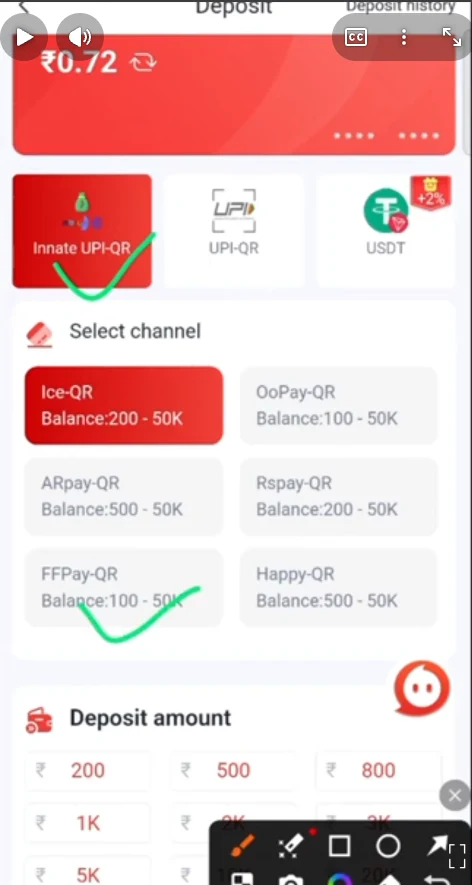
Choose Rajagame Deposit Channel
You will see channels like:
- Instant UPI QR (your “innate ups cru”)
- UPI QR
- Other UPI‑based options (“used” / additional UPI channels)
Each channel has multiple QR payment gateways, for example:
- IceQR
- OOPayQR
- ARPayQR
- RePayQR
- FFRPay / Happy QR
Each gateway has its own limit range, usually like:
- ₹200 – ₹50,000 or
- ₹500 – ₹50,000
Choose the channel + gateway that matches how much you want to rajagame deposit.
Select Rajagame Deposit Amount
On the same screen, you’ll see preset amounts such as:
- ₹100, ₹300, ₹500, ₹1,000, ₹2,000, ₹3,000, ₹5,000, ₹10,000, ₹20,000, ₹30,000, ₹40,000, ₹50,000
You can:
- Tap one of the quick amount buttons, or
- Enter a Custom Amount manually (within the minimum–maximum limit of the chosen channel)
Read Recharge Instructions & Confirm
- Carefully read the recharge/deposit instructions shown on the screen:
- Check limit, valid time (if any), and any special note for that channel.
- Once you understand and confirm everything is correct, tap “Deposit”.
Choose UPI App and Scan/Upload QR
After tapping rajagame Deposit:
- You’ll see a QR code on your screen (for Paytm / PhonePe / Google Pay / UPI Pay etc.).
- You have two options:
- Option A – Scan Live from UPI app
- Open your Paytm / PhonePe / Google Pay / other UPI app
- Use the Scan QR feature and scan the QR directly from another device or screen.
- Option B – Screenshot & Upload in UPI app
- Take a screenshot of the QR code.
- Open your preferred UPI app.
- Choose “Scan from gallery” / “Upload QR”.
- Select the saved QR screenshot.
- Option A – Scan Live from UPI app
- Enter the exact same amount you selected on RajaGame.
- Complete the UPI payment (enter UPI PIN and confirm).
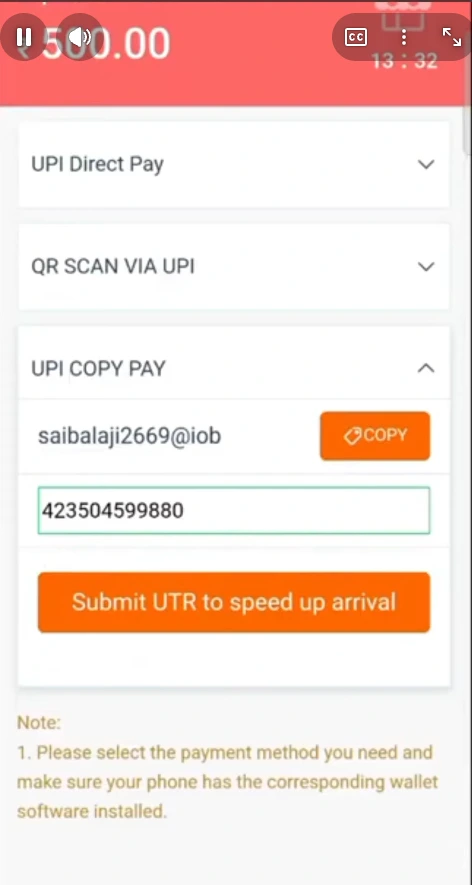
Enter UPI Reference Number (UTR)
After successful payment in your UPI app:
- Open the payment details or transaction history in your UPI app.
- Find the UPI Ref/UTR number (12‑digit or similar transaction ID).
- Copy this UPI Ref/UTR number.
- Go back to the RajaGame deposit page.
- You will see a field like “UPI Ref No / UTR / Transaction ID”.
- Paste the copied UTR there.
- Tap “Submit / Confirm”.
This step is very important – it helps RajaGame match your payment and credit it quickly.
Wait for Wallet Credit
- After submitting the UTR:
- Wait a few seconds, then refresh your Wallet balance.
- In most cases, the rajagame deposit is credited instantly or within a couple of minutes.
- If the money does not show:
- Double‑check that:
- You paid the correct amount
- You used the correct QR for the chosen channel
- You entered the correct UPI Ref/UTR number
- If still not received after a reasonable time, contact RajaGame support with:
- Screenshot of UPI payment
- UPI Ref/UTR number
- Your Login ID
- Double‑check that:
(Your reference video – QR screenshot → scan in UPI app → copy UTR → paste in app → refresh wallet – matches exactly this flow.)
Tips for Safe & Successful Deposits
- Always use official RajaGame deposit page only.
- Do not edit or fake payment screenshots – this can cause account review or block.
- Pay only to the QR code generated in the app for your transaction, not old screenshots or forwarded images.
- Always enter/paste the correct UPI Ref/UTR to avoid delays.
- If one channel appears busy or fails, try another UPI QR gateway within the app.
Withdraw Your Winnings Instantly on RajaGame
After adding funds and playing your favorite games on RajaGame, you can easily withdraw your winnings anytime. The withdrawal process is simple, fast and fully secure, allowing you to receive your money directly in your bank account or UPI. Just submit your withdrawal request, verify your details and get paid within minutes. RajaGame ensures smooth and transparent payouts so you can enjoy gaming without payment worries.
FAQs – RajaGame Deposit
My payment is done, but balance is not showing in RajaGame. What should I do?
First, wait 2–5 minutes and refresh your Wallet. If still not credited, check that you:
1. Paid to the same QR shown in RajaGame
2. Entered the correct UPI Ref/UTR number
3. If everything is correct and still no update, contact support with payment screenshot + UTR + Login ID.
What is the minimum and maximum deposit amount?
Each payment gateway (IceQR, OOPayQR, ARPayQR, RePayQR, FFRPay, Happy QR, etc.) has its own limits, usually ₹200–₹50,000 or ₹500–₹50,000 per transaction. On the deposit screen, you’ll see the exact min/max limit for the selected channel.
Can I use Paytm, PhonePe, Google Pay, or any other UPI app?
Yes. RajaGame supports Paytm, PhonePe, Google Pay and other UPI apps through UPI QR. Just:
1. Scan the QR or upload its screenshot
2. Pay the exact amount
3. Copy the UPI Ref/UTR and submit it on RajaGame
I entered the wrong amount or wrong UTR. Will my deposit be credited?
If the amount or UTR does not match, the system may fail to auto‑match your payment. In that case:
Contact support and share:
Correct amount
Time of payment
UPI Ref/UTR
Screenshot of transaction
They will manually check and guide you. Always double‑check before submitting.
Can I cancel a deposit after paying via UPI?
Once the UPI payment is successful, it usually cannot be cancelled from the app side. If there is a genuine mistake (wrong amount/QR), immediately contact RajaGame support with full details. Final decision depends on payment status and banking rules.